
Overview | News | Windows | macOS | Android | iOS | Audio Formats | Components | Encoder Pack | Screenshots | Help & Support | Developer | Old Versions | Other Projects | Blog & Rants
Fomalhaut
By: Locutus
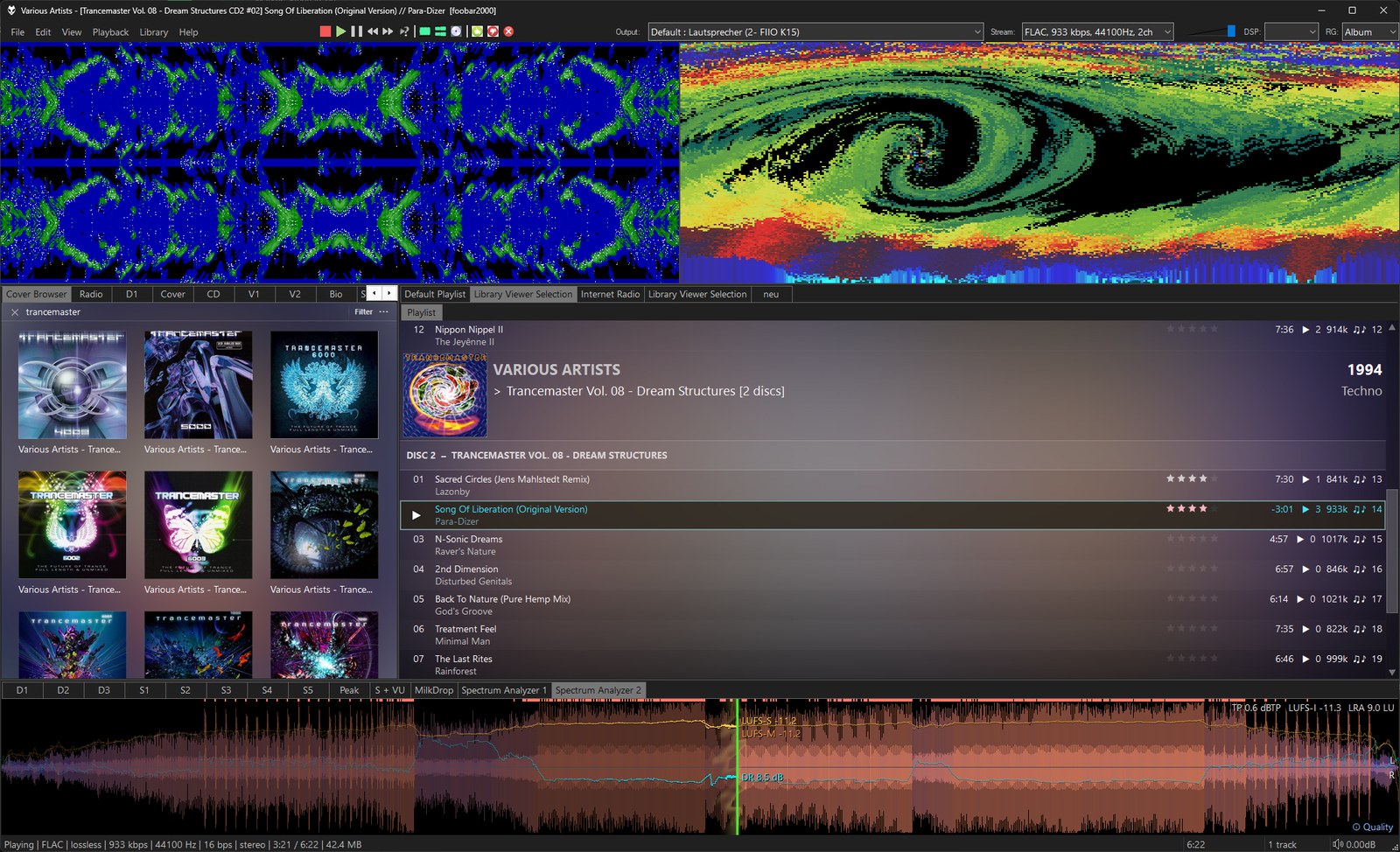
Retro music visualisations inspired by Cthugha and the Atari Video Music. The sound is drawn into an image that burns, flows and mirrors itself from frame to frame – rebuilt effect for effect from the original programs. And the first music visualiser for the home, Atari's Video Music C240 from 1977, comes back as a simulation of its circuit.
Modes
Features
Installation
Add the panel to your layout: Default UI – category Visualisation; Columns UI – category Visualisations. Right-click the panel to choose a mode.
Requires foobar2000 2.0 or newer (32 or 64 bit) and Windows 10 or 11. Free for non-commercial use, closed source.
Credits: Cthugha © 1993–1998 Kevin "Zaph" Burfitt, Torps Productions · Cthugha-L © 1995–1998 Harald Deischinger · Cthugha-4-Winamp © 1998 Krunoslav Pisacic. Not affiliated with the original authors.
Modes
- Cthugha 5.3 DOS (320 × 200, 1995) – with all extras: palettes, pictures and translation tables
- Cthugha98 (640 × 480, 1998) – including its particle scenes and the 3D views of the 3dfx version
- Cthugha-L (Linux, 2000) – adapts to the panel size, with its 3D displays
- Cthugha-4-Winamp (640 × 480, 1998) – the Winamp/ModPlug plug-in: beat-driven, 3D letters spell the song title
- Atari Video Music C240 (4:3) - the Atari Video Music C240 (1977): diamonds, holes and rings in the colours of the music, with its front panel
- Mix – all of them in turn, with a short fade
Features
- True to the originals: same formulas, tables, palettes, frame rates and random sequences; bugs that spoiled an effect are fixed
- Fullscreen on one or more monitors (middle click or F11)
- Effect changes per mode: as in the original, after beats, every few seconds, on each new song
- Presets like Cthugha's CTHUGHA.INI, the classic Cthugha keys (press ? or F1 in the panel)
- Song title overlay in the original VGA font
- Automatic input level, so today's music drives the effects as lively as a well-set sound card did
- Optional CRT filter for every mode – RGB monitor or TV,
- Compatible with the Default User Interface (Default UI) and the Columns User Interface (Columns UI)
Installation
Add the panel to your layout: Default UI – category Visualisation; Columns UI – category Visualisations. Right-click the panel to choose a mode.
Requires foobar2000 2.0 or newer (32 or 64 bit) and Windows 10 or 11. Free for non-commercial use, closed source.
Credits: Cthugha © 1993–1998 Kevin "Zaph" Burfitt, Torps Productions · Cthugha-L © 1995–1998 Harald Deischinger · Cthugha-4-Winamp © 1998 Krunoslav Pisacic. Not affiliated with the original authors.
Current version: 1.1.0, released on 2026-10-18
Change log:
-
New mode: Atari Video Music C240 (1977) – a simulation of the device's circuit: diamonds, holes and rings in the colours of the music, shown on a TV picture
- Move the mouse to the bottom of the picture: the front panel slides in – press its buttons and turn its knobs as on the device
- The same controls are in the right-click menu and on the new preferences page "Atari Video Music"
- New: CRT filter for every mode – RGB monitor or TV, set per mode in the right-click menu ("CRT filter (this mode)") or under Preferences > Fomalhaut > Modes
- The preferences page "Effect changes" is now called "Modes" and also holds the CRT filter
- Smoother drawing in large panels and in fullscreen
- Fixed: a help text on the effect changes page was cut off
Supported systems: Windows 32-bit, Windows 64-bit.
Works with foobar2000 v2.0 and newer.
Works on Windows 10 and newer.
Links
View version history
Home page
Documentation
Discussion
More components
Browse all
Browse by author: Locutus
Tags: Columns UI panel, Default UI element, visualization